Lagbuster, RouterOS edition: same brain, no BIRD
I swapped the BIRD box at the core of my network for a MikroTik. Lagbuster only knew how to drive BIRD, so I taught it RouterOS and kept the same latency failover.
A while back I built Lagbuster to fix something BGP won't: a session can stay up while the path behind it quietly goes from fast to terrible, and BGP doesn't care. Lagbuster pings each edge router, learns what's normal for it, and moves the BGP primary off a peer that's gone slow, with enough damping that it doesn't flap.
It worked well. But it only knew one way to act on a decision: write a priorities file and run birdc configure. It was a BIRD integration through and through.
And then I replaced the BIRD router.
What Changed
The core router at home, the one that learns routes from my edges over WireGuard and decides which way traffic goes out, used to be a Linux box running BIRD. Now it's a MikroTik CCR2004 running RouterOS. No BIRD, no birdc, no priorities file to edit. The one thing Lagbuster knew how to drive was gone, and with it my automatic failover.
I didn't do anything about it right away. BGP was still up, traffic was still flowing, and it was easy to forget anything was missing.
Then Ashburn Went Bad
Until one evening I was poking around in NetPulse and saw the latency to my Ashburn edge go bonkers, sitting at 135 to 180ms instead of its usual 20. The session was up the whole time. Nothing was moving traffic off it.
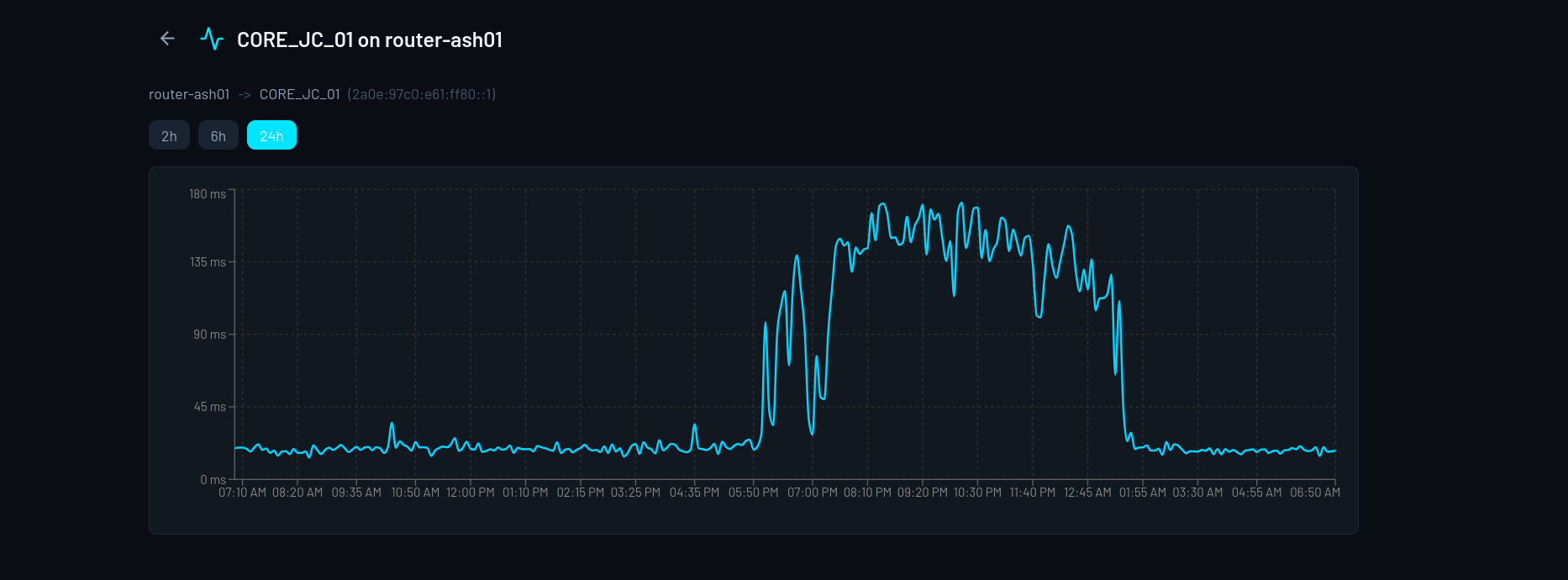
Latency to Ashburn over one evening: ~20ms normally, 135 to 180ms while it was bad, then back. The session never dropped.
That is exactly what Lagbuster is for, and I didn't have it running anymore. Time to get it back.
First I Tried Doing It on the Router
My first thought was to skip the external daemon and do it all on the MikroTik. RouterOS has netwatch for pinging and a scheduler for running scripts on a timer, so in principle the logic could live right on the router.
I tried. By hand it worked fine: the script spotted the slow path and flipped the primary. On the scheduler it fell apart. The counters reset every run, the damping never built up, and nothing happened. I'm sure there's a clean way to hold state between scheduled runs, and I just don't know RouterOS scripting well enough to see it. Before long it was clear I was fighting the platform.
Back to Lagbuster
So I went back to Lagbuster itself. The useful part of it, the baselines and the damping, never cared what router was on the other end. Only the last step, actually applying the change, was BIRD-specific. I left the decision engine alone and gave it a second way to apply a decision: call the MikroTik's REST API instead of writing a BIRD file.
How the MikroTik Picks a Path
Each iBGP connection on the MikroTik points at a pair of route filters, one for routes it receives and one for routes it sends. I keep two pairs ready on the router:
primary: high local-pref in, normal announcement out
secondary: lower local-pref in, and out it adds a community that tells the edge to prepend my AS a few times
Local-pref decides which edge I send traffic to. The prepend decides which way the internet comes back. Same trick I used under BIRD.
Switching the primary doesn't touch any rules. The filters just sit there, and Lagbuster only changes which pair each connection points at: the primary filters for the chosen edge, the secondary filters for the rest. Applying the same decision twice does nothing, and a failed apply leaves a connection on a known-good filter instead of a half-written one.
The New Backend
It's small. It finds each BGP connection and repoints it at the primary or secondary filters. There were a few RouterOS quirks to work around, but nothing that changed the shape of it.
The decision engine behind it is the same code as before: ping the edge loopbacks every 10 seconds, compare each one against its own baseline, drop a primary after 3 bad samples (about 30 seconds), and don't fail back to it until it has been healthy for a solid 30 minutes. Fast to leave, slow to come back.
Where It Runs Now
Old Lagbuster ran as a systemd service on the router, because the router was Linux. The MikroTik won't run a Go daemon, so it lives in a small LXC on my Proxmox box in the DMZ. It pings the edge loopbacks across the WireGuard mesh and talks REST to the MikroTik over the LAN. It still exposes the same status API, so it shows up in NetPulse exactly like before.
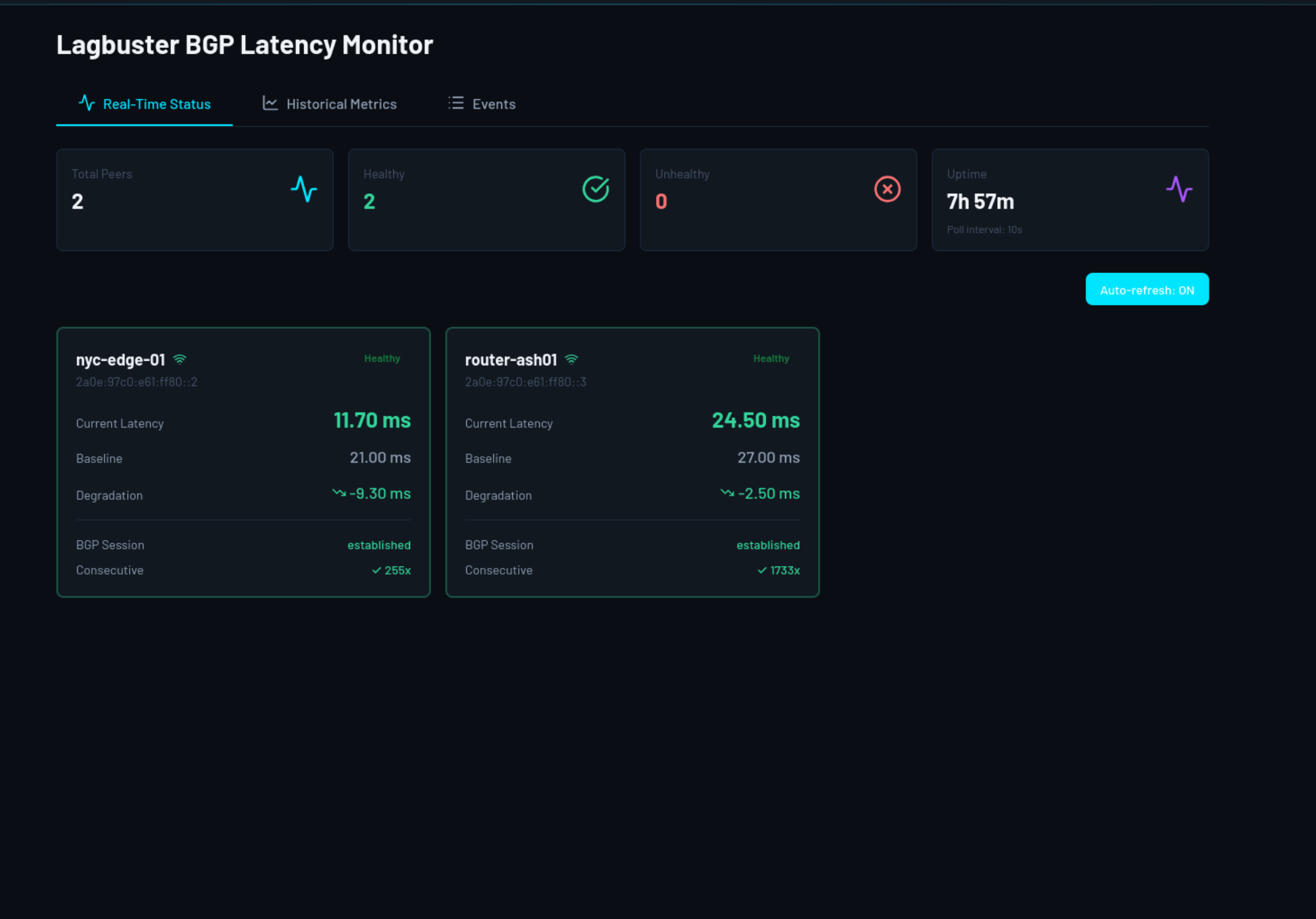
Lagbuster's dashboard, driving the MikroTik now instead of BIRD.
The First Real Test
I deployed it that same night, while Ashburn was still bad, so I didn't have to stage anything. It came up, saw ash at about 160ms, and within 30 seconds had marked it unhealthy and moved the primary to New York. A few hours later ash recovered, stayed healthy for its 30 minutes, and it moved the primary back.
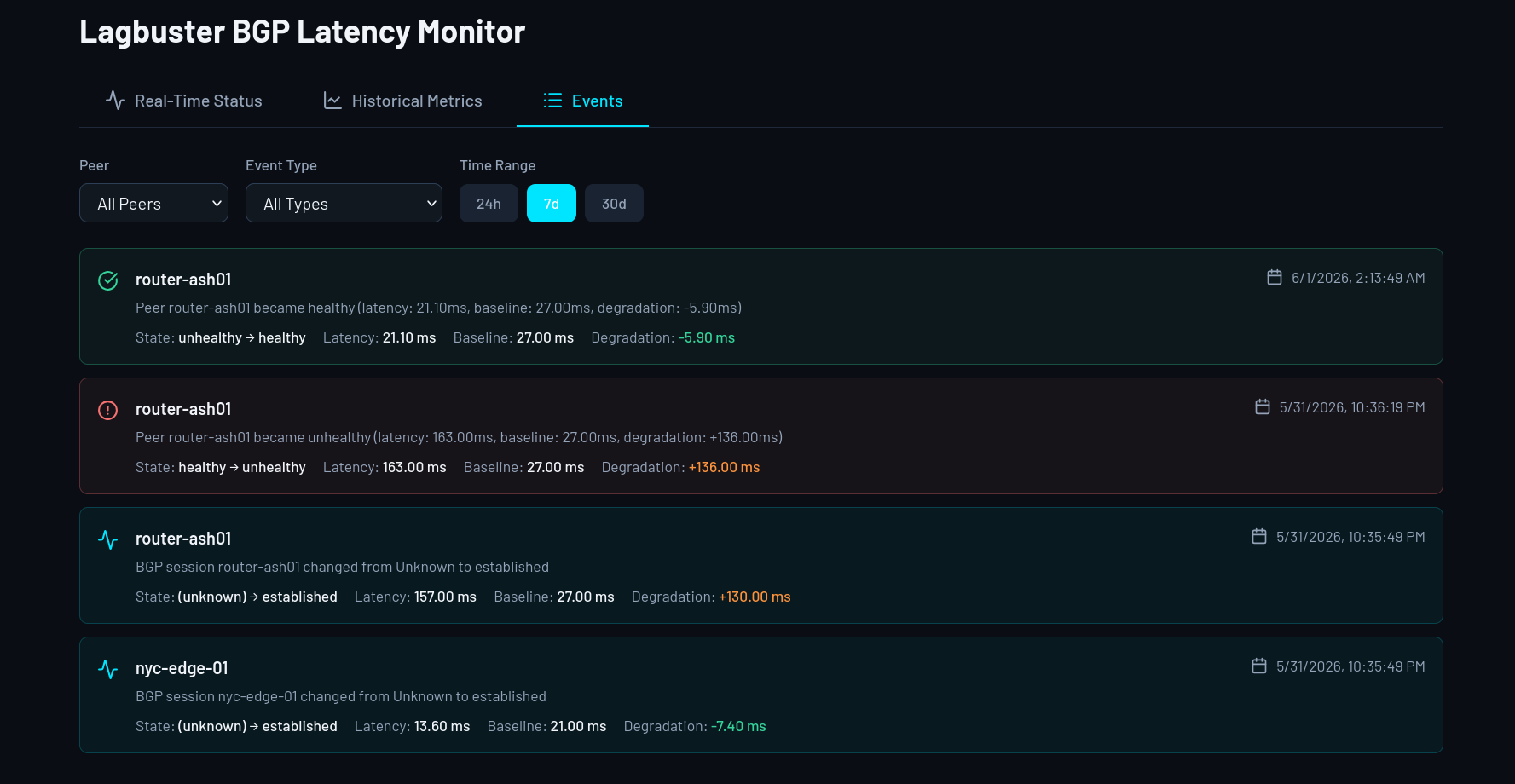
Startup, then ash flagged unhealthy 30 seconds later at +136ms over baseline, then healthy again hours later and back to primary.
That was last night, so it's hardly battle-tested yet. But on its first evening it caught a real problem and handled it. I changed routers and kept the part I actually cared about.