Building Lagbuster: automated BGP path switching for the rest of us
BGP is great at keeping you connected, but it doesn't care if your traffic is taking the scenic route up and down the East Coast.
BGP is great at keeping you connected, but it doesn't care if your traffic is taking the scenic route up and down the East Coast. Sessions stay up, traffic keeps flowing, and nothing alerts you when your primary path quietly goes from snappy to miserable.
The Problem
AS215855 runs three nodes: edge1 in Ashburn, VA, edge2 in New York City, and downstream in Jersey City which acts as the core router. edge1 and edge2 are the edges with upstream transit. edge1 peers through iFog (AS34927) and edge2 through Vultr (AS64515). downstream sits in the middle, learns routes from both edges over iBGP, and is where traffic decisions actually happen.
edge1 is the primary (priority 1) and edge2 is secondary (priority 2). Most of the time edge1 is fine and traffic flows through it. But things break. Upstream congestion, a transit provider having a bad day, whatever. When that happens, the BGP session to edge1 stays up while actual performance tanks. Bird is totally happy. I am not.
The options were: notice it and SSH in to manually tweak local preferences and reload Bird, or don't notice and let things be slow. Neither felt great.
What I wanted was something that would watch the actual performance of each path and handle the switch automatically, without creating more instability than it solved. I couldn't find exactly that, so I built it. I called it Lagbuster.
How It Works
Lagbuster runs on downstream, the core router. Every 10 seconds it pings each edge router, compares the result to a configured baseline, and decides if anything needs to change.
Each peer has its own baseline. Just measure what's normal for each router and use that. edge1 and edge2 have different natural latencies from downstream's perspective, so health is evaluated relative to each peer's own baseline rather than comparing them against each other. edge1 at 95ms when it normally does 10ms is a problem. edge2 at 30ms when it normally does 27ms is fine.
A peer is considered unhealthy when its latency exceeds its baseline by more than the degradation threshold (20ms in my config), or hits an absolute ceiling of 150ms regardless of baseline.
Preventing Flapping
To prevent flapping, a peer needs to be unhealthy for three consecutive measurements (30 seconds at 10-second intervals) before Lagbuster acts on it. After a switch, there's a 3-minute cooldown before it'll switch again. And for recovery, a peer needs 12 consecutive healthy measurements (2 minutes) before it's brought back into rotation. The asymmetry is intentional. Fail fast, recover slowly.
The decision logic ends up being pretty readable: if the current primary is healthy and comfortable, stay put. If it's been unhealthy for three measurements, find the best healthy alternative and switch. If we just switched, wait.
Integrating with Bird
I didn't want Lagbuster to own my entire Bird configuration. Ansible already manages that. So Lagbuster only touches one file.
It writes to /etc/bird/lagbuster-priorities.conf, which defines numeric priority variables:
define downstream_edge1_lagbuster_priority = 1;
define downstream_edge2_lagbuster_priority = 2;
The iBGP mesh template references those variables to set local preference. When a peer goes unhealthy, its priority gets set to 99 and local preference drops to 10, effectively removing it from path selection. When Lagbuster decides to switch, it updates that file and runs birdc configure. The whole thing takes under 2 seconds. Ansible can still manage all the peer configs, filters, and everything else without knowing or caring that Lagbuster exists.
The Web UI
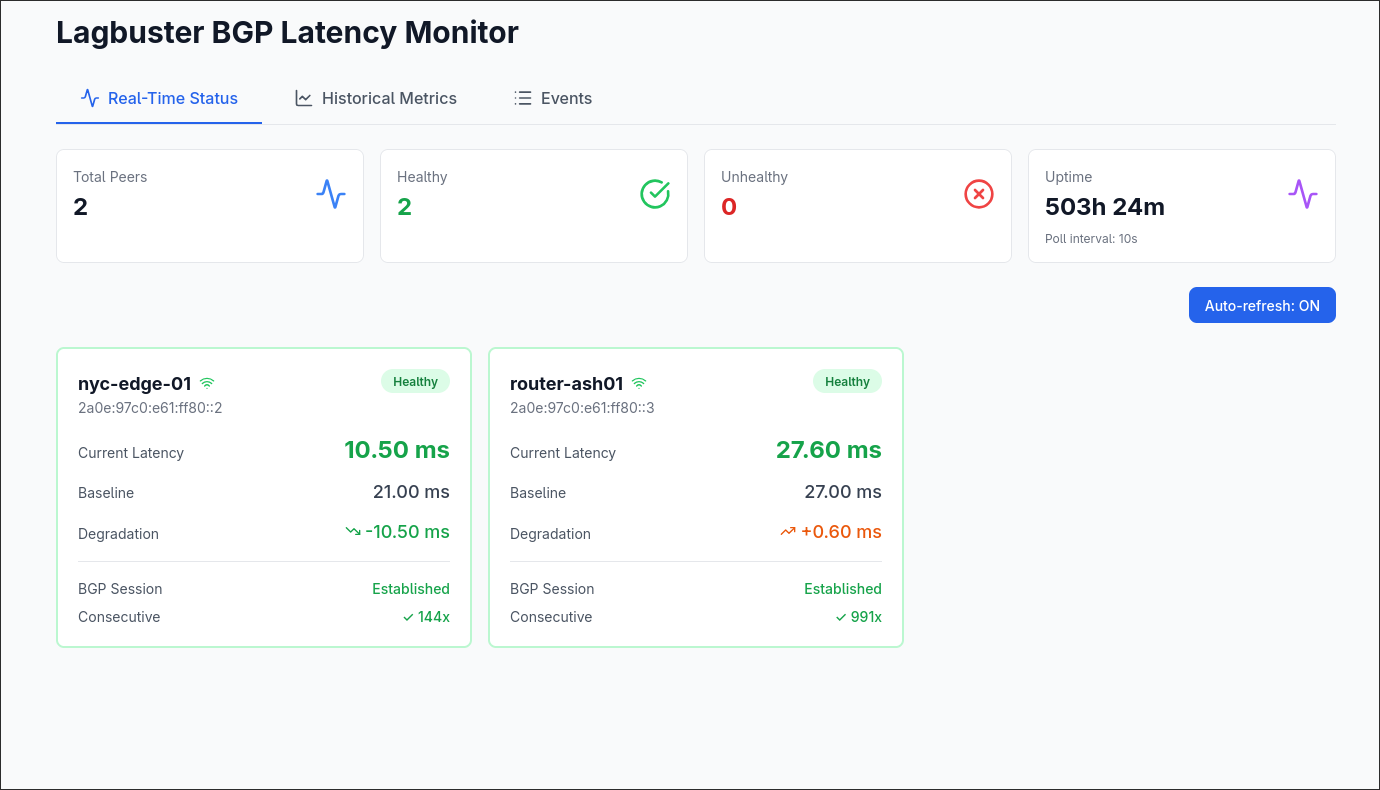
Once Lagbuster was running and doing its job, I wanted visibility without tailing logs. So I built a web UI on top of the REST API and WebSocket feed that the Go binary exposes.
The frontend is React 18 with TypeScript. The main dashboard shows each peer as a card with current latency, baseline, degradation from baseline, BGP session state, and how long it's been in its current health state. A WebSocket connection keeps everything live without polling.
There's a metrics page with per-peer latency graphs using Chart.js, with time range selectors for 1h, 24h, 7d, and 30d. The data comes from SQLite where every measurement gets recorded, so you can look back and see exactly what happened during an incident rather than piecing it together from logs.
An events page shows the full history of health transitions and path switches with reasons. A settings page lets you configure notification channels (email, Slack, Telegram) without touching the YAML config directly.
Conclusion
Lagbuster has been running on downstream for a while now, and the best thing I can say about it is that I mostly forget it's there. That's the goal.
The thing that surprised me most was how much of the work ended up being the damping logic rather than the monitoring itself. Pinging a router and measuring latency is trivial. Deciding when a measurement means something, and when to act on it, is where you can really cause harm if you get it wrong. I rewrote the threshold and cooldown logic a few times before I was happy with it.