Free failover: turning building WiFi into a secondary ISP
Turning free building amenity WiFi into an automatic failover ISP using a ThinkPad, a USB ethernet dongle, and a Python script to beat the captive portal.
My apartment building has amenity WiFi. The kind with a captive portal that makes you click "I agree" before it lets you out. It's free, it's there, and it's fast enough that I started wondering whether I could turn it into a failover ISP for my home network.
Turns out you can. All you need is a laptop, a USB ethernet dongle, and a willingness to reverse-engineer a captive portal.
The idea
Comcast went down one evening. While I was waiting for it to come back, I connected my laptop to the building's community WiFi to get back online. The building uses a different ISP, so it was working fine. And then I started thinking: why not use the building WiFi as a permanent failover link?
Dual-WAN failover is straightforward on my router. The routing is simple: two DHCP clients, two default routes, different distances. Lower distance wins. If the primary goes away, the secondary takes over. I'd used it for temporary uplinks before, but never had a permanent second connection.
The building WiFi was right there, free and always on. The only problem is that you can't plug WiFi into an ethernet port.
Unless you put a computer in between.
Meet idefix
I had a ThinkPad X1 Carbon (5th gen) still sitting in one of the moving boxes. It was running Ubuntu 22.04, which tells you how long it had been since anyone touched it. Built-in WiFi, and a Realtek 2.5G USB ethernet dongle. That's enough to build a gateway.
The setup is straightforward. The laptop connects to the building WiFi over its internal WiFi card and gets internet. The USB ethernet dongle connects to my router on a dedicated /24 subnet. The laptop runs dnsmasq as a DHCP server on the dongle interface, hands the router an address, and masquerades all traffic from that subnet out through the WiFi interface.
From the router's perspective, it's just another WAN port with a DHCP-assigned address and a gateway. It doesn't know or care that the gateway is a laptop routing traffic over WiFi through a captive portal.
MikroTik <--ethernet--> USB dongle (idefix) WiFi <--air--> Building AP <---> Internet
The failover is just a matter of setting the default route distance on each DHCP client:
/ip dhcp-client
set [find interface=sfp-sfpplus1] default-route-distance=1
set [find interface=ether2] default-route-distance=2
Comcast at distance 1 is preferred. If it goes away, the route through idefix at distance 2 takes over automatically.
The captive portal problem
The building WiFi has a captive portal. Every time you connect, it intercepts your HTTP traffic and redirects you to a login page where you have to accept the terms of service before it lets you through.
For a laptop sitting in a closet with no screen, that's a problem. I could open a browser on my own computer, accept the portal every time the session expires, and call it a day. But if I'm going to bother with a failover link, it should actually work unattended.
So I looked at what the portal actually does. Fetched the login page with curl, read the HTML, and found something interesting: it's a MikroTik hotspot portal. The building runs UniFi APs and switches on every floor, but the gateway doing the captive portal is a MikroTik. The giveaway was the authentication flow. MikroTik's hotspot uses CHAP with an MD5 challenge embedded as octal escapes in the page's JavaScript. That pattern is unmistakable if you've seen it before.
The login form has a hardcoded username of "user" with an empty password. The JavaScript computes MD5(chap_id + password + challenge) and POSTs it. No credentials, just a TOS acceptance gate.
A few lines of Python later, I had a script that:
- Checks if the internet works (HTTP 204 from Google's connectivity check endpoint)
- If not, fetches the login page, extracts the CHAP challenge, computes the MD5 hash, and POSTs the login
- Exits silently if everything is fine
A cron job runs it every five minutes. The portal session expires periodically, the script re-authenticates, and the link stays up without any human intervention.
The failover test
With everything configured, I wanted to see what a real failover looks like. I started a continuous ping from my laptop to 1.1.1.1 and then disabled the Comcast interface on the MikroTik.
64 bytes from 1.1.1.1: icmp_seq=13 ttl=54 time=17.938 ms
64 bytes from 1.1.1.1: icmp_seq=14 ttl=54 time=16.354 ms
Request timeout for icmp_seq 15
64 bytes from 1.1.1.1: icmp_seq=16 ttl=52 time=11.285 ms
64 bytes from 1.1.1.1: icmp_seq=17 ttl=52 time=7.183 ms
64 bytes from 1.1.1.1: icmp_seq=18 ttl=52 time=8.727 ms
One dropped packet. That's the entire failover event. You can see it in the TTL change, 54 on Comcast, 52 on Starry (two extra hops through idefix and the building network). The latency actually improved, dropping from ~17ms to ~7ms.
When I re-enabled Comcast, the same thing happened in reverse. One dropped packet, TTL flips back, traffic returns to the primary path.
The monitoring panel
Since idefix is always running and always connected, I built a small dashboard to keep an eye on it. A Python collector service samples metrics every 10 seconds and writes them to a SQLite database. A separate web server reads from the database and serves a status page.
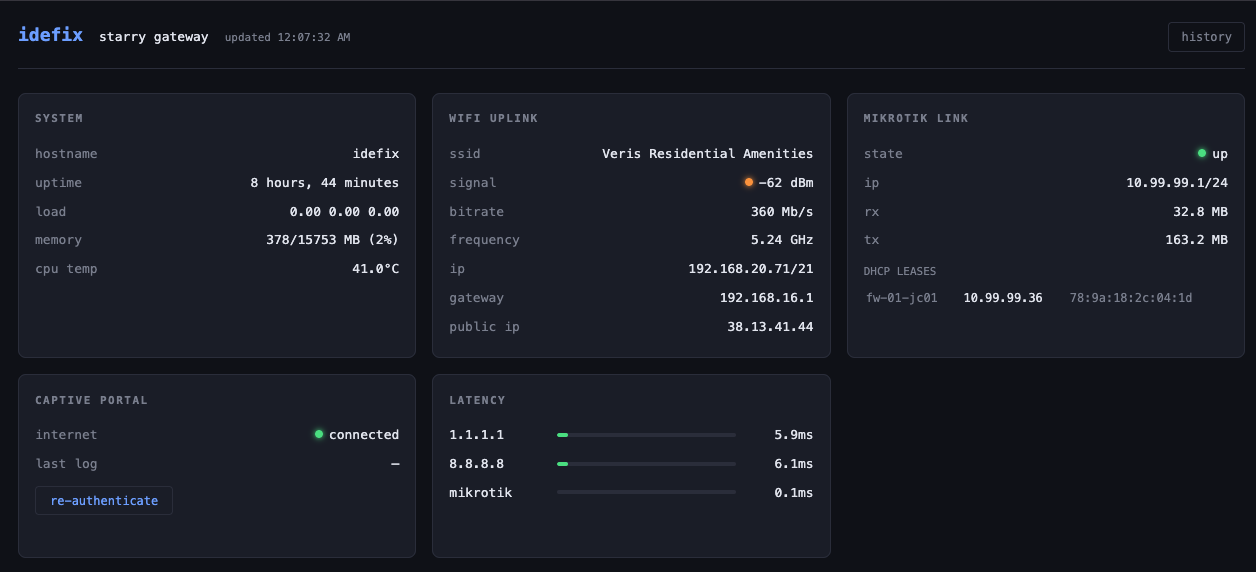
The dashboard shows the live state: WiFi signal strength, DHCP lease, captive portal status, latency to a few targets. A separate history page has time-series charts for everything: bandwidth through the link, latency over time, WiFi signal, CPU temperature, system load.
There's also a button to manually trigger the captive portal re-authentication, which has come in handy exactly once so far.
What's actually running on the building network
With idefix sitting on the building WiFi, I couldn't resist poking around. An nmap scan of the gateway confirmed it's running MikroTik RouterOS. The RouterOS API port (8728) identified it explicitly. The API even responds to login challenges, which puts the firmware somewhere in the RouterOS 6.43-6.48 range based on the authentication protocol. That's roughly 2021-era firmware.
The network setup is interesting. The gateway does ARP proxy for the entire /21 subnet. Every single IP in the range resolves to the gateway's MAC address. Full client isolation. You can't see or reach any other device on the WiFi. All traffic goes through the MikroTik, which is exactly how you'd want to run a shared building network.
The throughput is solid too. Speedtest shows 145 Mbps down and 107 Mbps up with about 6ms of latency. For free building amenity WiFi routed through a captive portal, that's genuinely good.
The total bill of materials
- One ThinkPad X1 Carbon that was collecting dust
- One USB ethernet dongle (Realtek RTL8156B 2.5G, about $15)
- One ethernet cable
- Building WiFi (free)
- About 200 lines of Python
The laptop draws maybe 8 watts sitting idle with the screen off. The failover is automatic, the captive portal re-authenticates itself, and the monitoring runs without intervention. If Comcast goes down at 3 AM, I'll wake up on Starry and probably never notice.
Is it production-grade? No. The WiFi could go down, the laptop could crash, the building could change their portal. But for a secondary link that costs nothing and fails over in one packet, I'll take it.